An editorial assessment of documented capabilities and ownership trade-offs. This is not a hands-on test result or a measurement of reliability.
Task capability 30%8.4
A ready mobile base supports projects beyond simple driving.
Navigation & control 20%8.5
SDK and hardware integrations provide meaningful development scope.
Ownership & upkeep 20%7.7
Removable battery helps ownership while drive care remains.
Setup & usability 15%7.6
Preassembly helps, but expansions require engineering.
Documentation & support clarity 15%8.5
Official SDK and device resources support a reproducible workflow.
Compare scores within the same product category. Small decimal differences should not override your needs or the evidence limits.
How the Standpoint Score works
We score five aspects of the documented product on a 0–10 scale, then calculate a weighted total:
- Task capability30% of the total
- Navigation & control20% of the total
- Ownership & upkeep20% of the total
- Setup & usability15% of the total
- Documentation & support clarity15% of the total
This product’s 8.2/10 is a provisional research assessment. It does not claim measured performance, tested reliability or a verified customer satisfaction rate. Compare it with products in the same category, and read each criterion’s reasoning above.
Read the full rubric and score bands ↗The ownership case.
RVR+ is a credible choice for educators and makers who want a programmable mobile base that can grow into hardware projects.
Reasons to consider it
- Expansion-friendly platform
- Removable battery
- Public SDK
Go in knowing
- Advanced applications need added hardware
- Payload and power integration require care
- School connection policies can constrain setup
The specification sheet.
Published specifications from the linked sources. Configurations and availability can differ by country.
- Form
- Programmable rover
- Battery
- Removable rechargeable
- Sensors
- Colour, light, IR, gyro and accelerometer
- Development
- Sphero Edu and Public SDK
A ready-made base for projects
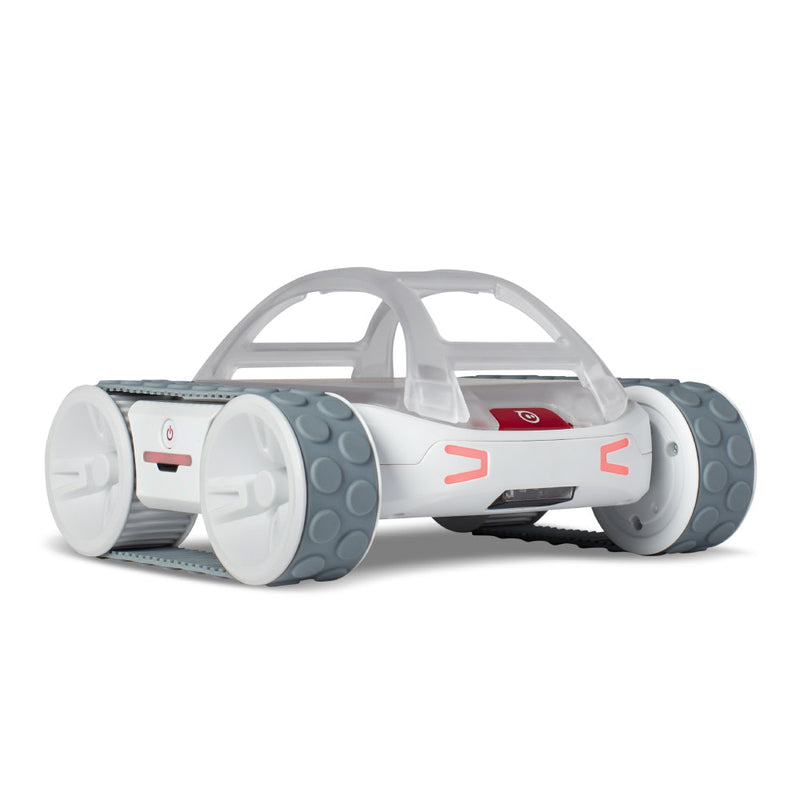
RVR+ occupies a useful middle ground between a sealed coding toy and a robot built from individual motors and controllers. Sphero supplies a programmable mobile base with sensors, a removable rechargeable battery and mounting provisions for additional hardware. The official page describes work through Sphero Edu and the Public SDK, including integration with platforms such as Raspberry Pi or micro:bit. That makes it interesting for learners who want to spend more time on behaviour and less time solving basic drivetrain assembly. It does not mean every advanced project is ready out of the box. Cameras, computing, task-specific sensors and integration may still be separate work. We have not tested RVR+ and assess it here as a documented project platform.
The base removes one kind of difficulty
Building a robot from scratch teaches valuable mechanical and electrical lessons, but it can also delay the software experiment a class actually wants to perform. RVR+ provides a known mobile chassis so learners can begin with movement, events and sensor data. That is a rational purchase when the curriculum focuses on control or autonomous behaviour. It is less appropriate if the objective is learning how motor drivers, gearing and chassis construction work. Be explicit about which difficulties you want the product to remove and which you want students to encounter. A ready-made base is not inherently more or less educational than a kit; its value depends on the learning questions it allows the group to investigate.
Expansion is an engineering task
The mounting platform and supported interfaces make RVR+ adaptable, but adding hardware changes mass, balance, power demand and cable routing. A small computer or sensor should be mounted securely and supplied within the documented electrical limits. Do not assume that an advertised compatible platform means every accessory can be connected without additional components or code. Start with a simple known example and verify each layer before adding complexity. We would evaluate how clearly the documentation explains power, communication and mounting, because those are common sources of avoidable frustration. A robot that runs a demonstration can still require considerable work to become a reliable custom system. That integration effort belongs in the project's schedule and budget.
Real sensors make uncertainty visible
The source lists colour, light, infrared, gyroscope and accelerometer sensing. These enable activities where the robot responds to its environment rather than merely replaying a timed sequence. They also introduce measurement uncertainty. A colour threshold that works under one lamp may need adjustment under another; a collision or slippery surface can alter a route. Those are useful lessons when learners are encouraged to inspect data and revise assumptions. Do not present a classroom robot as a precision measurement instrument without validation. We have not measured sensor accuracy or motion repeatability. The platform's educational strength is that it makes the relationship between sensing, decisions and movement accessible, with room to explore why physical results differ from ideal code.
The software path needs a device check
RVR+ supports accessible programming and more advanced SDK-based work, but the exact workflow depends on the host device and the project's architecture. Confirm the current app or browser support, Bluetooth permissions and any school-managed restrictions before buying. A working programme on a teacher's personal laptop is not proof it will run on every student device. For advanced work, check the supported library versions and examples rather than assuming an old online tutorial remains current. Keep project code and configuration under sensible version control when several people collaborate. The robot can simplify the mechanical platform while software integration still requires care. A successful classroom deployment needs a reproducible setup that another learner can follow.
Mobility should be matched to the task
RVR+ is promoted as a capable mobile base, but a classroom floor, outdoor path, deep carpet and loose gravel present different conditions. Confirm the permitted environment in the current instructions and test the intended surface at modest speed. Obstacles that look small to a person may be significant to the robot. Added equipment can reduce clearance or change stability. Keep the route away from stairs, traffic, water and bystanders during experimentation. We have not assessed terrain performance or obstacle handling. The useful question is whether it can repeatedly carry the intended project through its actual course, not whether a promotional video shows it crossing a more dramatic obstacle once.
The removable battery is a practical feature
A removable battery can make classroom logistics and eventual service more manageable, provided replacements remain available and the handling procedure is followed. It can also allow a project to separate robot availability from a single charging interval. Check whether spare batteries and a suitable charging arrangement are included in the quoted package. Plan secure storage and adult supervision appropriate to the learners. Runtime depends on movement, payload and accessories, so use the actual workload for planning rather than the longest headline. We have not measured endurance. A class set should be piloted across a full lesson schedule, including charging between sessions, because an otherwise capable robot is not useful if it repeatedly runs out of power before the activity reaches its conclusion.
Maintenance and total project cost
The chassis, tyres or drive surfaces, battery, mounting accessories and external electronics all contribute to ownership cost. Inspect for hair or debris around moving parts and follow the approved cleaning guidance. Ask about repair and replacement parts before equipping a programme for several years. Compare the complete project bill with a kit such as mBot2 or a simpler BOLT+ activity. RVR+ may save integration time by supplying a reliable starting platform, but that saving should be weighed against the hardware still required for the intended application. A camera-based autonomous project, for example, is not purchased merely by buying a mobile base. We have not established long-term reliability and do not infer it from the platform's educational branding.
Our research conclusion
RVR+ is a credible choice for educators and makers who want a programmable mobile base that can grow into hardware projects. It is less compelling for a learner who mainly wants the satisfaction of assembling the entire mechanism or for a household seeking a finished autonomous helper. A useful pilot should include basic programming, one sensor-driven behaviour and one modest expansion, with setup time and failure recovery recorded. We have not conducted that pilot. The purchase is easiest to justify when the buyer can name the next two projects and the required interfaces. Its openness then becomes a practical capability rather than an attractive promise that may never be used.
Sources & further reading.
These are the sources behind this research review. Manufacturer claims are not independent performance measurements. Community accounts, when cited, describe individual experiences.
- Sphero RVR+ — official product information ↗manufacturer
- Sphero RVR public SDK FAQ ↗support
Documentation reviewed: 9 October 2026. Product software and regional bundles can change. Corrections and editorial disclosures.