An editorial assessment of documented capabilities and ownership trade-offs. This is not a hands-on test result or a measurement of reliability.
Features & capability 30%8.7
Pro and Max options, media engines and XDR display form a substantial documented workstation package.
Compatibility & connectivity 20%8.7
Built-in HDMI, SDXC and three Thunderbolt ports offer practical flexibility.
Ownership & upkeep 20%7.2
Fixed configuration choices and costly premium components make condition important.
Setup & everyday use 15%8.3
The smaller Pro format and dedicated ports suit mobile work with fewer adapters.
Documentation & support clarity 15%9.0
Apple separates chip-dependent display limits and HDR versus SDR brightness clearly.
Compare scores within the same product category. Small decimal differences should not override your needs or the evidence limits.
How the Standpoint Score works
We score five aspects of the documented product on a 0–10 scale, then calculate a weighted total:
- Features & capability30% of the total
- Compatibility & connectivity20% of the total
- Ownership & upkeep20% of the total
- Setup & everyday use15% of the total
- Documentation & support clarity15% of the total
This product’s 8.4/10 is a provisional research assessment. It does not claim measured performance, tested reliability or a verified customer satisfaction rate. Compare it with products in the same category, and read each criterion’s reasoning above.
Read the full rubric and score bands ↗The ownership case.
A compelling older workstation candidate when the exact chip, memory and display requirements match the job. Buy the configuration, service history and healthy screen, not merely the 14-inch Pro name.
Reasons to consider it
- HDMI and SDXC reduce adapter dependence
- Detailed XDR and ProMotion display specification
- M1 Pro/Max configurations support substantial creative workflows
Go in knowing
- Chip and memory configuration strongly affect suitability
- HDR brightness figures are not general SDR brightness
- Premium screen and battery condition need close inspection
The specification sheet.
Published specifications from the linked sources. Configurations and availability can differ by country.
- Processor family
- M1 Pro or M1 Max configurations
- Display
- 14.2-inch Liquid Retina XDR; 3024 × 1964
- Refresh
- Adaptive ProMotion up to 120 Hz
- Memory
- 16 or 32 GB; 64 GB available with M1 Max
- Connections
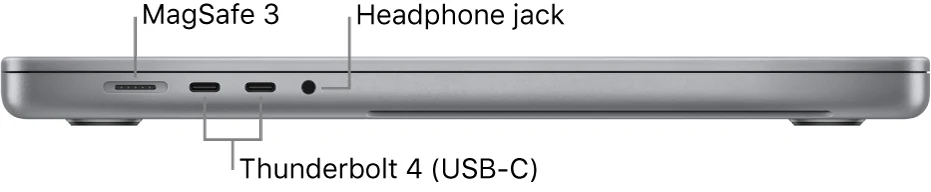
- Three Thunderbolt 4, HDMI, SDXC, MagSafe 3 and headphone jack
- Native display support
- Up to two external displays with M1 Pro; more with M1 Max under specified limits
- Camera
- 1080p FaceTime HD
A used workstation is a configuration, not a name
The 2021 14-inch MacBook Pro can be an attractive older professional computer, but the model name alone is insufficient to judge it. M1 Pro and M1 Max versions differ in graphics, memory options and external-display capability. Even within a chip family, configurations vary. A seller's short headline should be followed by a direct inspection of the machine's information before price comparisons become meaningful.
Begin with the work: the project sizes, application set, external displays and storage routine. Then identify the configuration that fits those requirements. The purpose of this review is to connect Apple's documented design with those decisions. We have not measured rendering speed, display accuracy or battery endurance, and we do not assume that an older workstation remains valuable merely because it carried a substantial original price.
The XDR specification needs its conditions attached
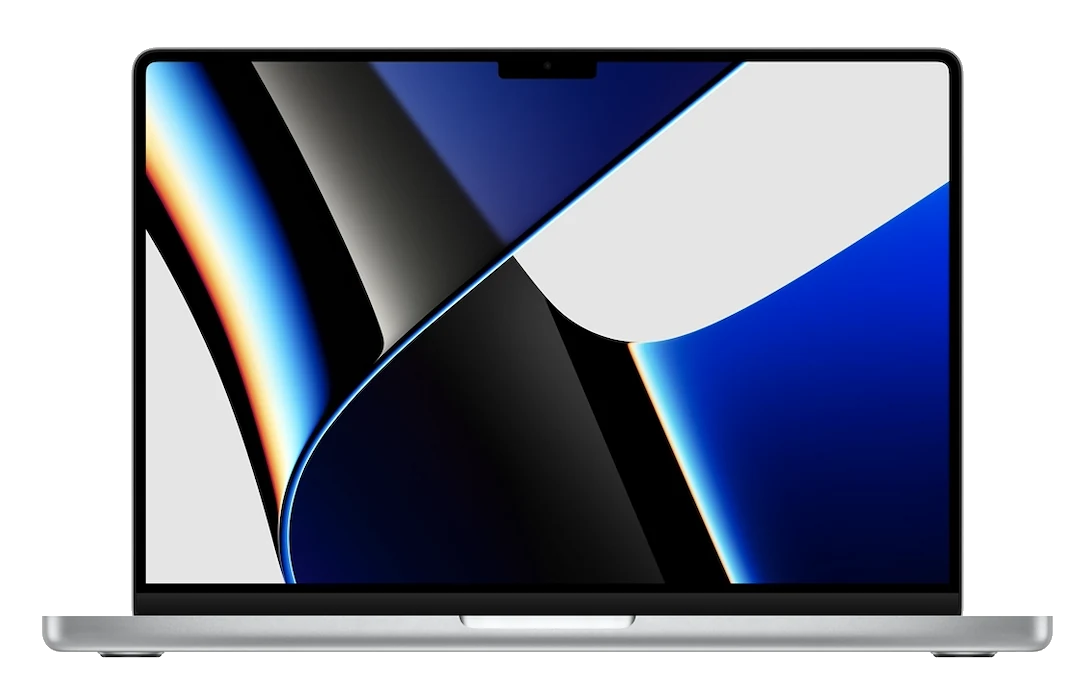
The 14.2-inch Liquid Retina XDR display and adaptive ProMotion are central attractions. Apple's specification distinguishes HDR brightness from ordinary SDR brightness, which is important when comparing numbers in listings. A peak HDR figure should not be presented as the brightness of every full-screen document under every condition. Think about the content and environment in which the display will actually be used.
For a creative workflow, inspect representative photographs or video and confirm that the software's colour-management arrangement makes sense. For a used purchase, first establish panel health through neutral backgrounds, ordinary text and a range of brightness settings. Look for bright pressure marks, damaged coating and inconsistent illumination. A premium specification cannot compensate for a compromised physical screen. The display is a major part of the value here, so visible faults deserve more weight than cosmetic wear on the lid.
Ports make field work less dependent on adapters
HDMI, an SDXC slot, three Thunderbolt 4 ports and dedicated MagSafe charging provide a useful set of direct connections. A photographer can think about card ingestion without immediately adding a reader, while a presenter may appreciate a direct display connection. These are practical reasons to choose this generation over a smaller two-port Mac. They should be evaluated against the actual equipment used, not simply counted as a longer specification list.
Test each relevant connection on the used machine. Read a card, transfer a file, attach the intended display and verify charging. Inspect for physical damage around the sockets. A port can look clean and still fail intermittently, so a short functional exercise matters. Built-in connectivity reduces accessory dependence only when the individual ports are healthy and their documented limits match the devices connected to them.
M1 Pro and M1 Max create different desks
Apple states different external-display arrangements for M1 Pro and M1 Max. That distinction can be decisive for a buyer planning several monitors. Count the screens, note their resolutions and refresh requirements, and compare the proposed setup with the exact chip's documented support. Do not assume that every 14-inch Pro can drive the most ambitious configuration shown anywhere in the product family's specifications.
The same discipline applies to docks and adapters. A device offering many physical outputs is not proof that the entire arrangement works in the desired combination. Test the real screens, power and peripherals during the return period, including sleep and reconnection. A workstation should return to a usable state predictably. The benefit of buying the right chip is not simply owning a more expensive component; it is meeting the specific display and processing requirements without improvised workarounds.
Memory should follow the largest normal project
The available memory differs with configuration, including a higher ceiling associated with M1 Max. Choose according to the working set rather than the smallest demonstration project. Include browser services, communication tools, creative applications and background processes that normally remain open together. A workstation may feel comfortable in a short isolated test and become restrictive once the owner's full day is loaded onto it.
Treat installed memory and storage as purchase decisions that must be settled before committing. Large local projects, caches and media libraries need room beyond the final export size. An external drive can extend storage, but it adds a connection and a backup responsibility. The best used configuration leaves enough margin for ordinary growth without buying capacity that has no realistic purpose. Compare equivalent working capability across listings instead of letting a discounted high-end chip distract from insufficient memory or storage.
Media engines are useful when the workflow uses them
The documented chip features include hardware support for several media formats. That can matter to a compatible editing workflow, but it does not guarantee that every effect, plug-in or export behaves identically. Identify the actual codecs, software versions and project complexity involved. A long feature list is not a substitute for testing representative material through the complete process.
Open a real project, move through the timeline or working documents and complete a sample export. Verify the output and note whether the experience is acceptable for the task. This is particularly important when moving from an older Intel setup with specialist plug-ins or hardware drivers. We have not run those tests on this computer, so the score reflects documented capability rather than a benchmark result. The buyer should establish workflow fit before the laptop becomes responsible for time-sensitive work.
Inspect the ordinary parts of the professional tool
The keyboard, trackpad, camera, microphones and speakers deserve attention alongside the processor. Type a substantial passage, check the function keys and Touch ID, then make a short call or recording. A professional computer can lose much of its convenience through a small input or audio fault even while its chip performs normally. Ask for repair records and inspect the enclosure for evidence of impact or liquid exposure.
Battery condition and the correct charger belong in the cost calculation. Different configurations originally used different power-adapter packages, so verify what the listing includes and whether it suits the intended charging behavior. Complete account removal and normal setup, ensuring former organizational management has been released. Check current software and peripheral compatibility. A seller's workstation label should not be used to excuse administrative restrictions or hardware issues that would be unacceptable in a simpler laptop.
A strong older Pro when its specification is matched
The 14-inch 2021 Pro is most persuasive for someone who will use its built-in ports, display and chip-dependent workstation capabilities. It is less compelling for light work that a cheaper, lighter Air handles comfortably. Conversely, a demanding user should not choose an underspecified example merely because it carries the same family name as a configuration that meets the job.
Our provisional verdict favors a healthy screen, suitable memory and a verified complete workflow, supported by credible seller protection. Compare total ownership cost with newer alternatives after storage, charger and potential battery work are included. No measured reliability or performance ranking is claimed. This generation's documented design offers substantial practical value; a successful purchase depends on selecting the actual configuration and condition that allow that value to appear in ordinary work.
Sources & further reading.
These are the sources behind this research review. Manufacturer claims are not independent performance measurements. Community accounts, when cited, describe individual experiences.
Documentation reviewed: 9 October 2026. Product software and regional bundles can change. Corrections and editorial disclosures.