An editorial assessment of documented capabilities and ownership trade-offs. This is not a hands-on test result or a measurement of reliability.
Features & capability 30%8.2
Full-frame stills, stabilization and broad hybrid tools cover varied work.
Compatibility & connectivity 20%8.1
Native Z lenses, adapted options and two media standards offer flexibility with conditions.
Ownership & upkeep 20%7.3
Replaceable batteries and documented firmware help, but mixed media and ageing bodies add costs.
Setup & everyday use 15%7.8
Physical controls and a tilting display suit stills; external video takes planning.
Documentation & support clarity 15%8.7
Nikon retains product documentation, manuals and a dated firmware listing.
Compare scores within the same product category. Small decimal differences should not override your needs or the evidence limits.
How the Standpoint Score works
We score five aspects of the documented product on a 0–10 scale, then calculate a weighted total:
- Features & capability30% of the total
- Compatibility & connectivity20% of the total
- Ownership & upkeep20% of the total
- Setup & everyday use15% of the total
- Documentation & support clarity15% of the total
This product’s 8.0/10 is a provisional research assessment. It does not claim measured performance, tested reliability or a verified customer satisfaction rate. Compare it with products in the same category, and read each criterion’s reasoning above.
Read the full rubric and score bands ↗The ownership case.
A sensible older Nikon hybrid for stills-first photographers who value manageable files and adaptable video. Budget for two media formats and assess autofocus with your actual subjects.
Reasons to consider it
- Moderate full-frame resolution limits unnecessary file volume
- Two card slots support deliberate backup arrangements
- In-body stabilization and an extensive Z-mount system
Go in knowing
- Different card formats complicate a spare-media kit
- Tilt screen is not a front-facing presenter monitor
- High-end external video options require additional equipment and configuration
The specification sheet.
Published specifications from the linked sources. Configurations and availability can differ by country.
- Sensor
- 24.5 MP full-frame BSI CMOS
- Processor
- Dual EXPEED 6
- Lens mount
- Nikon Z; selected F-mount lenses through FTZ adapters
- Card slots
- CFexpress Type B/XQD plus UHS-II SD
- Rear display
- 3.2-inch tilting touchscreen
- Published maximum burst
- Up to 14 fps under specified conditions
- Battery family
- EN-EL15c; compatibility limitations apply to older versions
The useful middle ground in an older full-frame kit
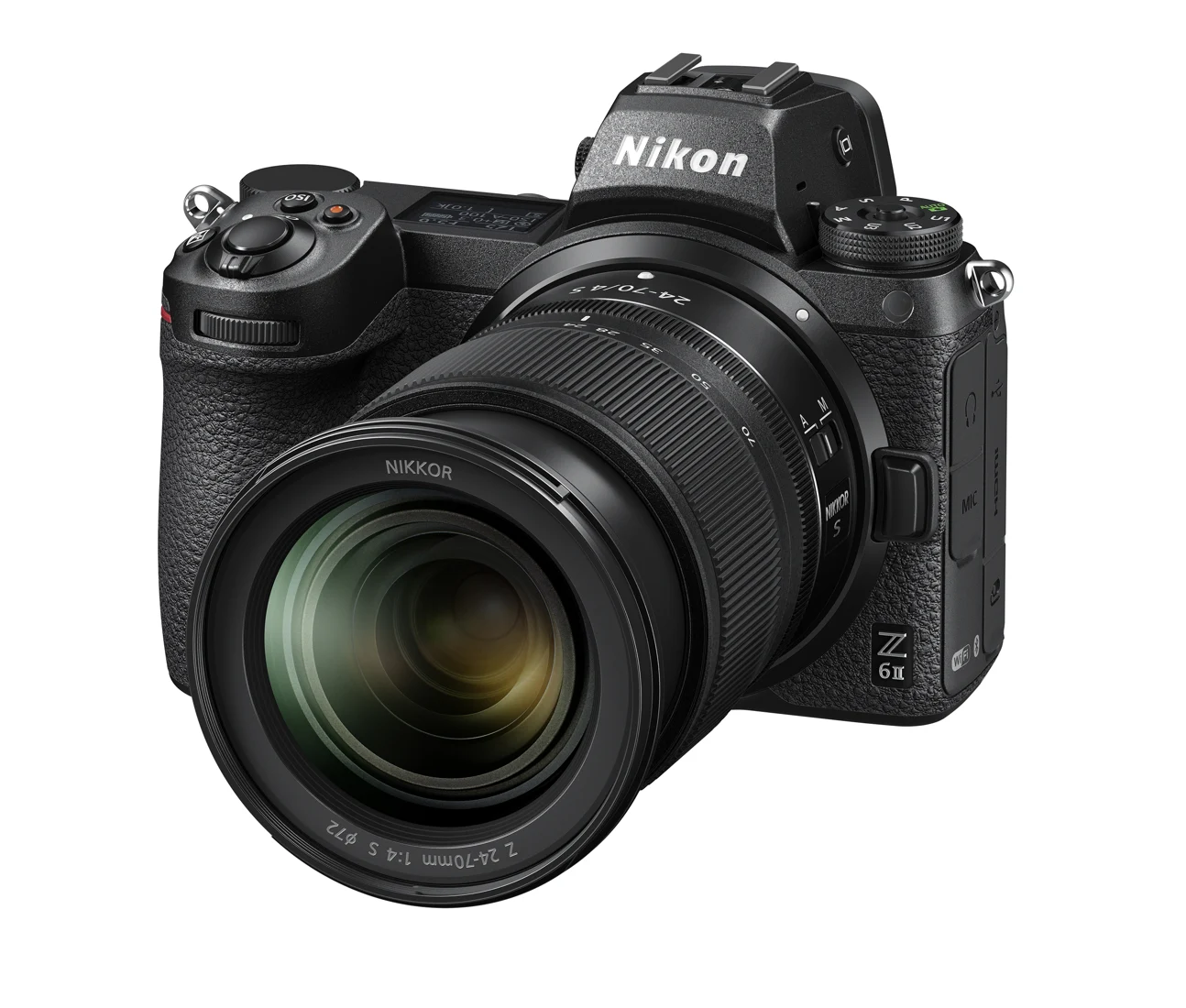
The Z 6II makes the most sense when the camera is one part of a carefully chosen kit. Its moderate resolution leaves room in the budget and workflow for lenses, dependable storage and time spent learning focus controls. A photographer delivering family albums, business portraits or ordinary editorial images may benefit more from a suitable lens than from a denser sensor. That is an argument about priorities, not a claim that this body matches every newer camera in difficult light or fast action.
Buying the Z 6II now also means separating the camera's original position in Nikon's range from the example on sale. A lightly used body with a known service history and a useful lens can be a different proposition from a heavily worked body at a similar headline price. Our assessment concerns documented capabilities and ownership decisions. We have not measured autofocus success, dynamic range, endurance or the condition of any individual secondhand unit.
Resolution and stabilization should serve the photograph
Nikon specifies a 24.5-megapixel full-frame sensor with in-body stabilization. That combination is attractive for handheld still photography because it provides room for ordinary cropping without making every file unusually large. It does not remove the need to choose an appropriate shutter speed. A stabilized camera can still record a moving child as a blur; stabilization addresses camera movement rather than freezing the subject. The distinction becomes especially important when photographing people indoors with a slow zoom.
Before buying a more expensive lens solely to exploit the sensor, identify the focal lengths you use and whether depth of field is helping or hindering your photographs. Full-frame equipment can make background separation easier to pursue, but it can also leave less of a group in focus at a wide aperture. A sensible first setup includes a comfortable working aperture, a minimum shutter speed appropriate to the subject and an ISO strategy that does not sacrifice the moment just to keep a number low.
Autofocus and burst specifications need an operating context
The documented autofocus system includes eye detection for people and supported animals, while the fastest published burst reaches 14 frames per second under specified settings. Neither number describes the percentage of useful pictures from a real sequence. Focus area, subject contrast, lens response, shutter speed and the photographer's ability to keep the intended subject in the frame all affect the result. A seller demonstrating a short burst at a static object has not demonstrated suitability for erratic sport.
For a used-body inspection, bring a lens and card you understand, then try a person approaching the camera and a subject moving across the frame. Inspect several consecutive images rather than the sharpest frame alone. Also try selecting a small subject against a busy background. These exercises reveal whether the controls and tracking behaviour fit your habits. They are suggested checks for the buyer, not results from a test we performed. For occasional portraits, repeatable subject selection may matter more than the highest burst setting.
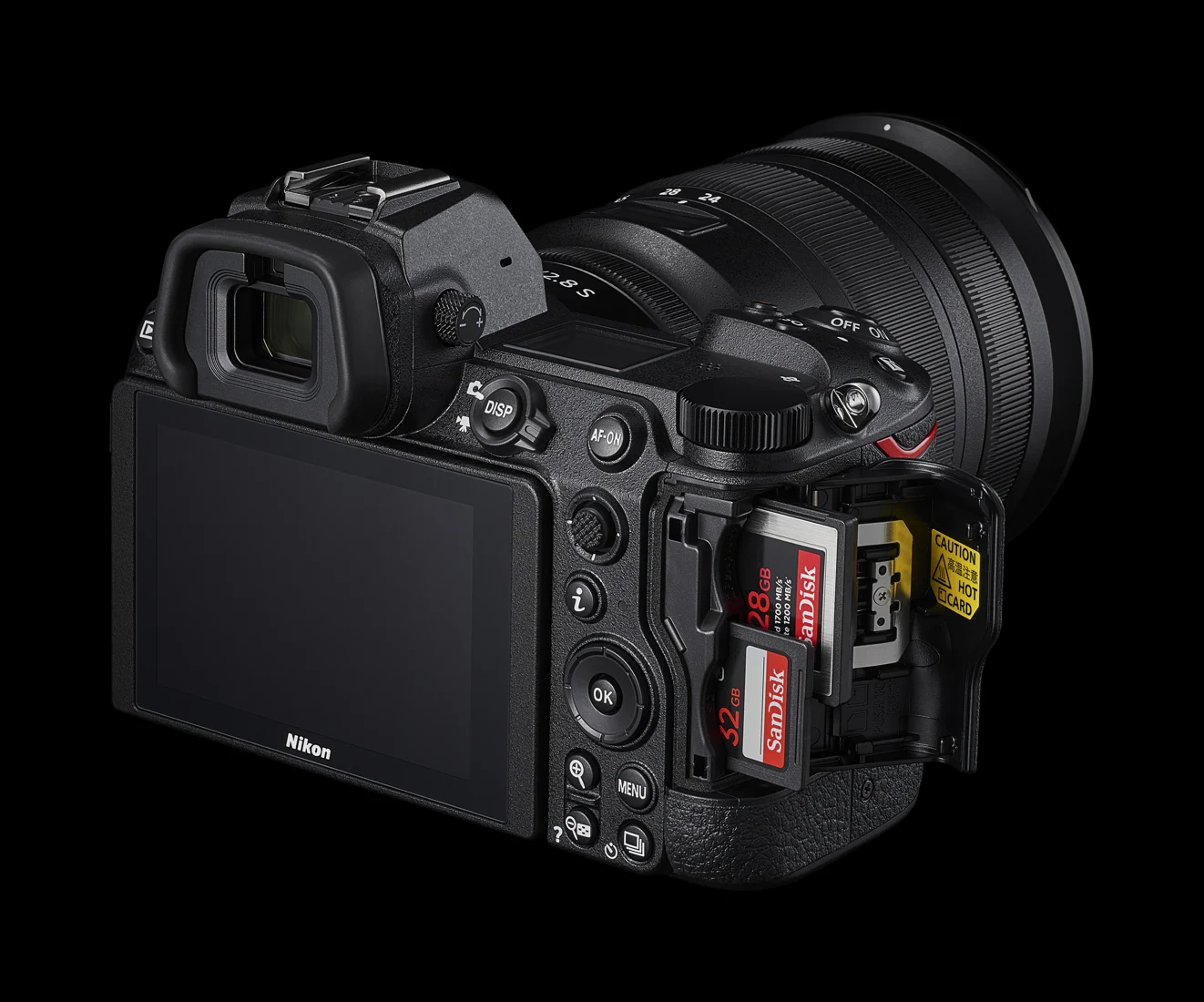
Two slots bring resilience and a mixed-media bill
The Z 6II combines a CFexpress Type B or XQD slot with a UHS-II SD slot. That is useful flexibility, but it does not mean the two slots have identical capabilities or that the camera automatically protects every file. Decide whether the second card should hold a duplicate, separate file types or overflow, then verify the relevant menu settings. A copied file on a second card protects against some media problems; it is not a substitute for an off-camera backup after the assignment.
A complete purchase calculation therefore includes suitable cards, a reader and a storage routine. Someone who already owns good SD cards may be able to begin economically, while someone planning long bursts or demanding recording modes should check Nikon's media guidance for that specific use. During inspection, write and read files from both slots. Bent contacts, a damaged door or intermittent card recognition can turn a superficially clean camera into an expensive repair. Check the actual cards rather than relying on a listing's phrase that everything works.
Video is a workflow decision before it is a format decision
Nikon documents internal recording and more elaborate external output options, including configurations aimed at grading. Those options should be priced as complete systems. A recorder adds power requirements, cables, mounting and another set of files to manage. A creator making straightforward interviews may prefer a simpler internal format that moves quickly into an editor. The existence of a more flexible output is useful only when the production and delivery workflow can take advantage of it.
The rear screen tilts but does not become a convenient front-facing presenter display. That affects solo filming, especially when a microphone or cable is attached. Check the exact firmware, recording mode, crop and output requirements before buying this body for a particular video specification; older promotional material can describe features as forthcoming even after firmware changes. A rehearsal should include audio monitoring, the intended clip length, transfer and export. This review does not establish thermal limits or uninterrupted recording endurance in any environment.
Lens compatibility is more than a mount label
Native Z lenses give the cleanest starting point for understanding the system, while FTZ adapters create a route for selected F-mount equipment. The adapter should not be treated as a promise that every old lens retains every function. Identify the complete lens model, then consult Nikon's compatibility guidance for autofocus, exposure and any other feature central to your work. A bargain body can stop being a bargain if the lenses you expected to reuse require replacement.
Handling matters just as much as electronic compatibility. A large adapted zoom changes the balance of the comparatively compact body and may make a support foot or different carrying arrangement sensible. Test the lens release, aperture operation and focus controls together. Buyers coming from another brand should compare the cost of a complete two-lens kit rather than comparing bodies alone. The long-term value of the Z 6II is tied to lenses you will actually carry, not to the maximum number of lenses that can theoretically be attached.
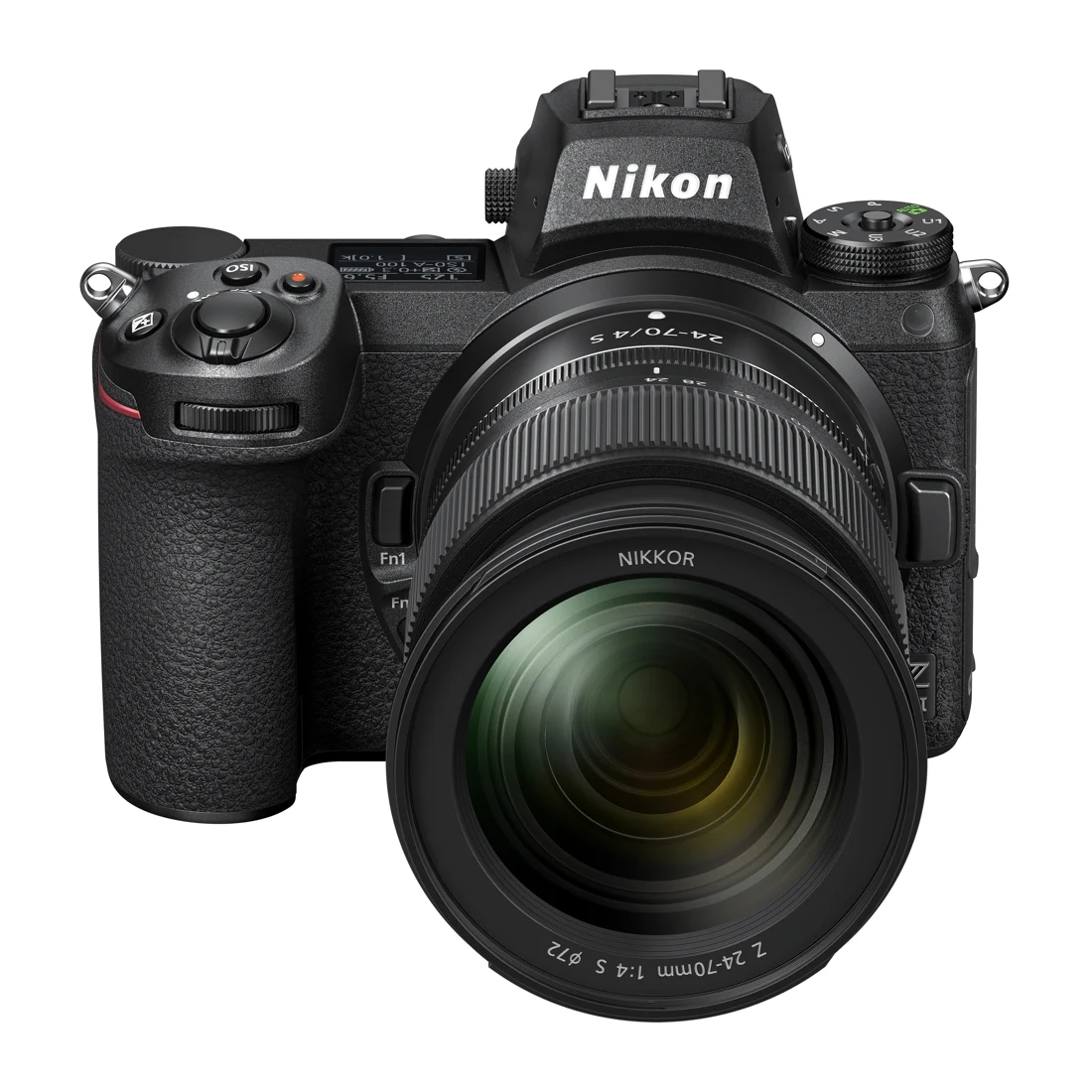
Used-body inspection, batteries and everyday upkeep
The EN-EL15 battery family deserves careful reading because compatibility, runtime and in-camera charging are not interchangeable across every version. Nikon lists EN-EL15c for this body and documents qualifications for older batteries. Ask which battery is included, inspect it for physical damage and confirm that the intended charging method works. An exhausted spare with a familiar label is not equivalent to a healthy original battery. Include a dependable charging arrangement in the purchase cost instead of assuming an unbranded bundle accessory is suitable.
Inspect the electronic viewfinder, touchscreen, card door, mount, sockets and control dials. Take a stopped-down photograph of an evenly lit surface to help reveal sensor contamination, while remembering that cleaning and repair are different expenses. Weather-resistant construction does not make an older body waterproof, particularly when seals and port covers have an unknown history. Store the camera dry, protect it during lens changes and use the cleaning procedures in Nikon's manual. Avoid treating cosmetic wear as the only indicator of care.
Firmware, regional service and the final buying case
Nikon's download centre lists Z 6II firmware C 1.70 dated June 3, 2025, alongside manuals and software resources. That is useful evidence of an available support route on the review's verification date, not a guarantee of future updates. Check the installed version and follow the exact update instructions with a charged battery and the correct file. Read the change notes before assuming an update adds a feature mentioned in a forum or in documentation for a different Z-series model.
For Canadian and US buyers, establish the country of original sale, receipt status and service eligibility before paying. A US product page does not prove Canadian stock, warranty transfer or cross-border coverage. The strongest buying case is a verified body, a sensible lens pairing and a workflow that benefits from two slots without demanding features this generation never promised. If fast unpredictable action or solo video dominates your work, compare those exact tasks against newer alternatives. For deliberate still photography, the Z 6II remains a coherent documented tool whose value depends on the whole kit.
Sources & further reading.
These are the sources behind this research review. Manufacturer claims are not independent performance measurements. Community accounts, when cited, describe individual experiences.
- Nikon Z 6II specifications and features ↗manufacturer
- Nikon introduces Z 6II and Z 7II ↗manufacturer
- Z 6II manuals and current download listing ↗support
Documentation reviewed: 9 October 2026. Product software and regional bundles can change. Corrections and editorial disclosures.