An editorial assessment of documented capabilities and ownership trade-offs. This is not a hands-on test result or a measurement of reliability.
Features & capability 30%8.6
The sensor, gimbal and documented capture tools form a focused creative proposition; results are unmeasured.
Compatibility & connectivity 20%8.1
Audio, storage and file choices support several workflows, with bundle and compatibility checks needed.
Ownership & upkeep 20%7.5
The moving assembly, media and accessory batteries introduce care and preparation tasks.
Setup & everyday use 15%8.3
A dedicated screen and tracking controls are promising for solo work, subject to practical evaluation.
Documentation & support clarity 15%8.6
Detailed specifications and support provide mode and storage guidance; durability and service remain untested.
Compare scores within the same product category. Small decimal differences should not override your needs or the evidence limits.
How the Standpoint Score works
We score five aspects of the documented product on a 0–10 scale, then calculate a weighted total:
- Features & capability30% of the total
- Compatibility & connectivity20% of the total
- Ownership & upkeep20% of the total
- Setup & everyday use15% of the total
- Documentation & support clarity15% of the total
This product’s 8.2/10 is a provisional research assessment. It does not claim measured performance, tested reliability or a verified customer satisfaction rate. Compare it with products in the same category, and read each criterion’s reasoning above.
Read the full rubric and score bands ↗The ownership case.
A focused documented tool for portable video where the gimbal and dedicated controls solve a real filming problem; rugged use and distant subjects need a different comparison.
Reasons to consider it
- A dedicated compact gimbal arrangement
- Screen and orientation workflow
- Documented tracking and audio options
Go in knowing
- Moving assembly needs careful handling
- Accessory contents differ by bundle
- Image quality, tracking and endurance are untested here
The specification sheet.
Published specifications from the linked sources. Configurations and availability can differ by country.
- Sensor
- One-inch CMOS
- Lens
- 20 mm equivalent; f/2
- Stabilisation
- Mechanical three-axis gimbal
- Screen
- Two-inch touchscreen
- Storage
- microSD; consult DJI’s recommended-card list
A camera that rewards a different way of filming
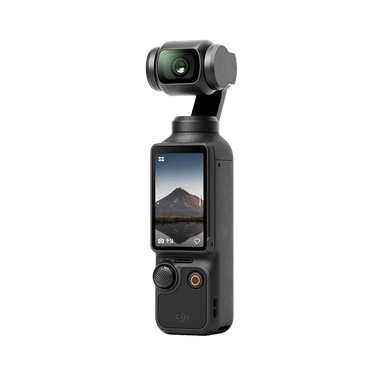
DJI Osmo Pocket 3 is a small camera built around a mechanical three-axis gimbal. Its proposition is different from that of a phone or a rugged action camera: it aims to make controlled handheld video convenient in a compact dedicated device. That can suit travel clips, a presentation, a walking interview or a creator filming alone. The first question is whether those are the jobs you actually do. Buying a dedicated camera makes sense when it removes recurring filming friction, rather than merely adding another object to a travel bag.
This review uses DJI's product page, specification sheet and support material. We have not filmed with Pocket 3 or measured stabilisation, autofocus, image quality or endurance. The provisional Standpoint Score reflects its documented creative scope and the work involved in using it. A gimbal mechanism establishes how the camera can move, not how smoothly every walking shot will look. A sensor specification establishes an imaging component, not the quality of a finished clip under the buyer's lighting and settings.
The sensor and lens create a clear starting point
DJI specifies a one-inch CMOS sensor and a 20 mm-equivalent f/2 lens. That establishes a broad field of view suitable for several close handheld uses. It also means framing needs thought: a wide view may include more background than intended or change how a face looks when the camera is held very close. Move the camera deliberately and inspect the composition before recording something important. A compact device should not encourage the assumption that every position gives a flattering or useful result.
The lens is not a substitute for a selection of optical focal lengths. Plan how close the camera can be placed and whether the chosen perspective suits the subject. Digital cropping can change framing, but it should be assessed at the intended delivery resolution. We would compare indoor, outdoor and moving-subject footage before describing detail or low-light quality. This article avoids imaginary claims about cinematic colour or exceptional shadow handling. The research case is that the documented imaging arrangement offers a coherent starting point for a portable video workflow.
A gimbal manages rotation, while the operator still moves
The three-axis mechanism is intended to control the camera's orientation. Walking introduces more than rotation: footsteps, changes of height and deliberate direction changes remain part of the shot. Good technique still matters. Practise the movement you plan to record and judge the footage at a normal playback size. The right expectation is assistance with camera movement, rather than a guarantee that every hurried walk looks as though it was made with a larger stabilised production system.
The mechanism also creates handling considerations. Follow DJI's storage and transport guidance, protect moving parts and avoid treating the camera as a rugged action device without checking the permitted use. We would inspect start-up, pocket storage and transitions between modes during ordinary work. A compact form is convenient only if the equipment can be carried and deployed without anxiety or unnecessary fiddling. The provisional upkeep assessment recognises the need for care around a moving camera assembly, while withholding a durability claim that would require longer observation.
The rotating screen is a workflow feature
DJI lists a two-inch touchscreen. Its rotation-based arrangement supports the product's different filming orientations, making the screen part of the operating workflow rather than just a preview. Think about where the finished clip will be published and choose the orientation deliberately. A creator producing both vertical and horizontal material should plan framing and available recording modes before assuming every shot can be repurposed equally well after capture.
A small screen needs a practical evaluation. Check whether focus, exposure and important menu choices can be inspected comfortably in the lighting where filming occurs. A bright shop demonstration is not evidence of legibility in sunlight or ease of changing a setting with cold hands. We would follow complete shots from start-up to file review and note any avoidable interruption. The useful feature is a screen and control arrangement that keeps attention on the subject, while making it clear what the camera is recording and how to correct a mistake.
Tracking helps a solo creator only when it stays predictable
DJI promotes subject tracking and focusing functions. These could be useful when filming alone, but the practical requirement is reliable framing in the intended scene. A person standing in front of a simple background presents a different challenge from a presenter moving beside another person. Check how tracking is selected, how it can be interrupted and what happens when the subject leaves the frame. A supported feature is not proof that it follows every subject perfectly.
Our next evaluation would include a presenter walking, turning and briefly becoming obscured, with the settings and firmware recorded. We would also inspect focus transitions and the ease of recovering a shot without restarting the entire session. For an important presentation, a deliberate fixed composition may sometimes be more dependable than an automated moving frame. The strongest research appeal is having both choices available. The outstanding evidence is how readily the operator can understand and control those choices under ordinary pressure.
Audio and bundles should follow the recording job
Pocket 3's onboard microphone arrangement and accessory options create several possible audio workflows. Begin with the environment. A camera near the speaker may have different needs from one placed across a room, and wind or traffic can dominate an otherwise attractive clip. Compare the exact standard and creator bundles before ordering, then identify which microphone, cable and accessory is actually included. An accessory pictured beside the camera should not be assumed to arrive in every package.
Audio deserves a complete test from recording to editing. Check synchronisation, levels, clothing noise and how another person hears the speech through ordinary headphones. An external microphone can improve one part of the workflow while adding charging, pairing and storage tasks. We would assess those tasks together rather than call a bundle professional because it contains more components. For a solo creator, the best arrangement is the one that is used correctly and consistently, not necessarily the most extensive collection of accessories available.
Cards, charging and files determine whether the camera travels well
DJI's specification sheet provides recommended microSD models and capacity guidance. Follow those current recommendations for the recording modes intended. A card's headline size cannot establish that it handles a sustained video workload correctly. Prepare and check the storage before a trip, and retain a separate copy of important footage rather than carrying the only files on the camera. A small shooting kit becomes much less useful if media management is improvised at the end of each day.
Charging claims also need their conditions. Consider how many separate filming sessions are planned and where the camera can recharge between them. High frame rates, screen use and accessory arrangements may change the practical result, which we have not measured. Check file formats and editing support before choosing a mode for a substantial project. The complete creative workflow includes transfer, playback, colour handling and export. A camera that records an advanced mode is not automatically convenient if the available computer or application cannot handle those files comfortably.
The research verdict
Pocket 3 presents a focused documented proposition for handheld video and solo creation where a mechanical gimbal and dedicated controls address an actual need. It is a more conditional fit for rough action use, distant subjects or someone satisfied with a phone-based workflow. Compare the complete package, including sound and storage, against the clips you plan to make. The most useful reason to buy it is that it makes those clips easier to capture well, rather than a hope that dedicated equipment automatically makes them more interesting.
A future report would inspect walking footage, focus and tracking behaviour, indoor image quality, audio and the editing round trip. It would identify the recording modes, firmware and accessories used. Until those observations exist, the Standpoint Score is a provisional assessment of capability and ownership demands. The camera's clear appeal is portable control over framing and movement. Its unresolved question is how consistently that control remains convenient through the ordinary interruptions, mixed lighting and file-handling work that make up a real day of filming.
Sources & further reading.
These are the sources behind this research review. Manufacturer claims are not independent performance measurements. Community accounts, when cited, describe individual experiences.
- Osmo Pocket 3 — official DJI product page ↗manufacturer
- Pocket 3 — specifications and recommended cards ↗manufacturer
- Pocket 3 — model-specific support ↗manufacturer
Documentation reviewed: 9 October 2026. Product software and regional bundles can change. Corrections and editorial disclosures.