An editorial assessment of documented capabilities and ownership trade-offs. This is not a hands-on test result or a measurement of reliability.
Features & capability 30%8.7
OLED, HDR and gaming options create a versatile documented package; picture quality is not measured here.
Compatibility & connectivity 20%8.5
Broad format and source support is useful, with the entire signal path needing verification.
Ownership & upkeep 20%7.5
Installation, panel care and possible external audio influence the complete ownership arrangement.
Setup & everyday use 15%8.0
webOS and picture controls offer choices, while shared use and setup remain to test.
Documentation & support clarity 15%8.4
Model-specific support and product material identify regional and feature conditions clearly.
Compare scores within the same product category. Small decimal differences should not override your needs or the evidence limits.
How the Standpoint Score works
We score five aspects of the documented product on a 0–10 scale, then calculate a weighted total:
- Features & capability30% of the total
- Compatibility & connectivity20% of the total
- Ownership & upkeep20% of the total
- Setup & everyday use15% of the total
- Documentation & support clarity15% of the total
This product’s 8.3/10 is a provisional research assessment. It does not claim measured performance, tested reliability or a verified customer satisfaction rate. Compare it with products in the same category, and read each criterion’s reasoning above.
Read the full rubric and score bands ↗The ownership case.
A broad documented entertainment package for someone seeking OLED and compatible gaming; brightness, reflections, motion and input lag still require measured evaluation.
Reasons to consider it
- Self-lit OLED display proposition
- Several documented gaming options
- Film and streaming compatibility
Go in knowing
- Room lighting and reflections remain untested
- Other sizes and regional configurations need separate checks
- Installation, audio and panel care add ownership decisions
The specification sheet.
Published specifications from the linked sources. Configurations and availability can differ by country.
- Reviewed configuration
- US OLED65C5PUA, 65-inch
- Panel
- 4K OLED
- Gaming refresh
- Up to 144 Hz advertised with compatible sources
- Formats
- Dolby Vision; Dolby Atmos compatibility
- Platform
- webOS; check local applications and update policy
An OLED television should be chosen for the room
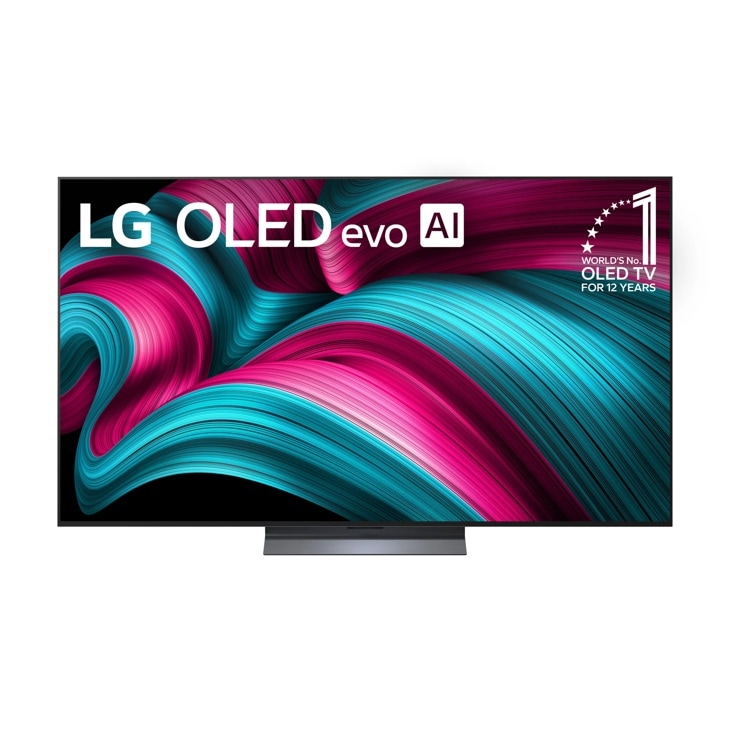
LG's C5 OLED is an attractive research candidate for a buyer who wants a television for films, streaming and games without making those separate purchases. This review focuses on the US 65-inch OLED65C5PUA configuration. Other sizes and regional models should be checked separately. The first buying question is the room: viewing distance, seating positions, windows, lighting and the space available for installation. A television praised in a dark demonstration can have a different practical fit in a bright family room.
LG's documentation establishes a broad feature set, but we have not measured brightness, colour accuracy, motion, input lag or reflections. The provisional Standpoint Score reflects the supported capabilities and ownership arrangement. It is not a laboratory picture-quality verdict. A sensible purchase should compare the complete installation and daily uses rather than selecting a screen because a picture preset looks vivid in a shop or a model has received favourable attention in an unrelated room.
Self-lit pixels provide a mechanism, not a complete verdict
The C5 uses OLED's self-lit pixel structure. That provides a different method of creating an image from a backlit display, and LG highlights its black-level proposition. The outcome still needs to be assessed with real material and settings. Shadow detail, bright highlights, colour handling and motion can vary with the source and picture mode. A television should preserve the information in the programme, not simply make one demonstration scene look dramatic.
For a buyer, choose familiar material with several kinds of difficulty: dark scenes, faces under ordinary lighting, sport and lower-quality broadcasts. Inspect it at the intended viewing distance rather than only standing close to the panel. We would measure and observe the display in defined modes before recommending a particular setting. This research article avoids claims about flawless contrast or reference accuracy that we have not established. The useful conclusion is that OLED offers a promising foundation, while implementation and room conditions determine how well that foundation serves the viewer.
Size and installation can dominate the ownership experience
A 65-inch screen is substantial enough that placement deserves planning. Check the exact dimensions, stand footprint, weight and mounting requirements for the local model before moving furniture or ordering a bracket. A nominal diagonal cannot tell you whether the television fits a cabinet. Leave the access and ventilation space required by the manual, and make sure the chosen position allows connections to be reached without repeatedly moving the display.
Wall mounting introduces additional considerations. Verify the mounting pattern and the suitability of the supporting surface with an appropriate installer where needed. Think about cable routes, socket positions and whether the height makes long sessions comfortable. A display can be technically excellent while being tiring to watch from an awkward angle. We would include the final viewing arrangement in an evaluation rather than make an installation recommendation from a front-facing product photograph. The purchase works best when the screen can be used comfortably and serviced without unnecessary disruption.
Gaming features need a compatible source
LG advertises refresh support up to 144 Hz and compatibility with NVIDIA G-Sync and AMD FreeSync Premium. Those describe supported gaming arrangements, not frame rates produced by every console or computer. Check the source device, cable, input and game settings together. A buyer using a console should investigate its actual output options rather than assume a PC-oriented maximum refresh mode will be used automatically. The complete signal path decides what reaches the screen.
Gaming quality also involves latency, motion clarity and presentation at the frame rates the player actually sees. We have not measured those outcomes. Our next evaluation would record the source hardware, game, output mode and picture settings, then compare behaviour across relevant combinations. If the television is routed through a receiver or switch, include that equipment in the check. A capability printed on the television's page is useful only when the installed setup can use it reliably without an unexpected limitation elsewhere in the chain.
HDR labels should be matched to the content
LG lists Dolby Vision and promotes film-oriented presentation modes. Those are useful compatibility and control options, but a format label alone does not establish the effect in a particular film. Content mastering, source quality, ambient light and television settings remain part of the result. Make sure the streaming plan or player actually supplies the desired format, and avoid evaluating an HDR claim with a lower-quality source that does not use it.
Picture processing should be tested deliberately. Automated adjustments can suit some viewers while changing the intended appearance in ways others dislike. Keep a record of settings and compare the same scene before deciding a feature helps. We would examine lower-quality material as well as pristine demonstrations, because ordinary television use often includes both. The provisional score recognises the documented tools and format support. It does not award measured brightness, colour or motion points simply because the menu contains an option intended to improve them.
webOS and external players are ownership choices
The C5 uses webOS, with LG describing its update programme and app platform. Verify that the services needed in Canada or the US are available on the exact local configuration. A service offered in another country may have different rights, applications or account requirements. Check the current policy and avoid treating an update programme as a promise that every third-party app will remain available indefinitely. The platform and the service provider make separate decisions.
An external streaming player can provide an alternative interface, but it adds a device, another update routine and possible remote-control complexity. Before buying one automatically, try the television's ordinary workflow and identify what needs improvement. Account setup, recommendations and voice functions should be configured deliberately, especially in a shared household. We would ask another household member to find a programme and change inputs without assistance. A platform that is convenient for the person who configured it is not necessarily convenient for everyone who watches the television.
Audio and panel care belong in the total cost
The screen's audio compatibility should not be mistaken for the experience of a full external sound system. Start by checking dialogue at the volumes and seating positions used in the room. If an external system is needed, verify connections, format handling and remote behaviour against both manuals. A soundbar that blocks the screen or remote receiver creates another problem. We would evaluate the complete arrangement before calling a compatible format an immersive listening experience.
Read LG's current panel-care instructions and warranty conditions for the exact model. A buyer using the display for long periods of static content should investigate that role carefully, rather than assume every television is equally suited to it. Follow the intended care routines and do not disable maintenance features merely because they are inconvenient. This review has no long-term panel observations. We therefore keep longevity and retention questions separate from the provisional capability score and avoid suggesting that a familiar brand or a new panel guarantees a particular service life.
The research verdict
The 65-inch C5 presents a strong documented combination for a buyer wanting one OLED television for cinema, streaming and compatible gaming. Its suitability depends on the room, local model and connected equipment. Compare the full cost of installation, audio and any external player against the actual viewing habits. Someone watching mostly background television in a difficult bright location should investigate alternatives rather than assume the most celebrated display technology is the right fit everywhere.
Our next report would include defined picture modes, calibrated measurements where appropriate, ordinary daytime viewing, game inputs and shared interface use. It would identify the exact screen size, firmware and regional configuration. Until that work is complete, the Standpoint Score remains a research assessment of documented breadth and ownership fit. The C5's compelling promise is versatility around a self-lit display. The missing evidence is how well that versatility survives the real sources, room lighting and daily routines that matter more than a showcase specification.
Sources & further reading.
These are the sources behind this research review. Manufacturer claims are not independent performance measurements. Community accounts, when cited, describe individual experiences.
- OLED65C5PUA — LG US product and specifications ↗manufacturer
- OLED65C5PUA — LG manuals and support ↗manufacturer
Documentation reviewed: 9 October 2026. Product software and regional bundles can change. Corrections and editorial disclosures.