An editorial assessment of documented capabilities and ownership trade-offs. This is not a hands-on test result or a measurement of reliability.
Features & capability 30%8.3
A dedicated player with broad documented format support can improve a specific viewing routine.
Compatibility & connectivity 20%8.5
The Ethernet and Thread model provides useful distinctions; end-to-end equipment compatibility remains necessary.
Ownership & upkeep 20%8.0
A contained hardware setup is appealing, while service subscriptions remain separate costs.
Setup & everyday use 15%8.4
Dedicated remote controls support a coherent proposition, with CEC and shared profiles still to verify.
Documentation & support clarity 15%8.5
The table clearly distinguishes configurations, cables and format requirements without rating support response.
Compare scores within the same product category. Small decimal differences should not override your needs or the evidence limits.
How the Standpoint Score works
We score five aspects of the documented product on a 0–10 scale, then calculate a weighted total:
- Features & capability30% of the total
- Compatibility & connectivity20% of the total
- Ownership & upkeep20% of the total
- Setup & everyday use15% of the total
- Documentation & support clarity15% of the total
This product’s 8.3/10 is a provisional research assessment. It does not claim measured performance, tested reliability or a verified customer satisfaction rate. Compare it with products in the same category, and read each criterion’s reasoning above.
Read the full rubric and score bands ↗The ownership case.
A persuasive documented player for an Apple household or an unsatisfactory TV interface; the larger configuration should be chosen for its connections and role, not storage alone.
Reasons to consider it
- Documented format compatibility
- A dedicated interface and remote
- Ethernet and Thread option
Go in knowing
- Streaming subscriptions are separate
- HDMI cable is sold separately
- Existing TV apps may already meet the need
The specification sheet.
Published specifications from the linked sources. Configurations and availability can differ by country.
- Processor
- A15 Bionic
- Configurations
- 64 GB Wi-Fi; 128 GB Wi-Fi + Ethernet
- Network distinction
- Gigabit Ethernet and Thread on the 128 GB model
- Formats
- Dolby Vision, HDR10+, Dolby Atmos support
- Remote
- Siri Remote with USB-C charging
Buy a better television routine, not another box
Apple TV 4K is a streaming player whose value depends on what it improves over the television's existing interface. Someone with a responsive smart TV that supports every desired service may have little reason to add another device. Someone dealing with a frustrating interface, a missing app or a broader Apple household may find a dedicated player useful. Begin with that specific problem. A small box should make viewing easier, rather than become another component that needs a remote, account and update routine.
This review covers the documented A15-based Apple TV 4K family with 64 GB Wi-Fi and 128 GB Wi-Fi plus Ethernet configurations. Model identity matters because the name has been used across generations. We have not tested interface responsiveness, picture output or home-control behaviour. The provisional Standpoint Score assesses the current documented connection and usability proposition. It is not a claim that this player produces a better picture than every television app or that it remains the newest configuration indefinitely.
Choose the model for networking and home functions
Apple's specification table distinguishes more than storage. The 128 GB model includes Gigabit Ethernet and Thread networking, while the Wi-Fi model follows a different connection arrangement. Those are practical reasons to choose a configuration. A television placed near a wired network outlet may benefit from a predictable cable connection. A buyer interested in the product's home-control role should verify the exact model's capabilities rather than assume the two boxes are functionally identical because they look similar.
Storage should still follow actual use. Apps and downloaded game content have different requirements from ordinary streaming, and more capacity does not automatically improve a stream. Consider what will be installed and retained locally. We would compare the complete household arrangement, including any smart-home role, before recommending the larger configuration. The sensible upgrade is one that provides a needed function or simplifies the connection. Buying it solely because the number is larger is less persuasive if the intended applications do not use that capacity meaningfully.
Format support is only one link in the chain
Apple documents output support including Dolby Vision, HDR10+ and Dolby Atmos. The source service, content, television and audio equipment must support the relevant arrangement as well. Check the entire route, particularly if a receiver or soundbar sits between the player and display. A format listed on the box cannot force an incompatible component to handle it. Nor does it establish the bitrate or mastering quality of a programme supplied by a streaming service.
We would inspect output settings with several actual services and content types. Film, sport and older television material can place different demands on frame-rate and dynamic-range handling. The aim is predictable presentation rather than a permanently forced setting that makes one demo impressive. Keep the television's own app available as a comparison where practical. This research assessment recognises the player's documented compatibility, while any claim about visible picture improvement belongs to a controlled comparison using the same content and an identified signal path.
The Siri Remote needs to fit the household
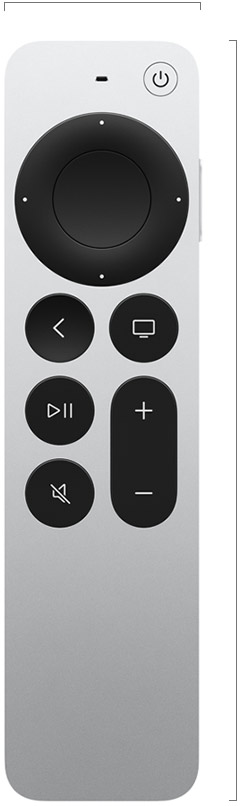
Apple's remote uses a touch-enabled clickpad, dedicated playback controls and USB-C charging. Its practical value is in how readily a person can navigate, change volume and recover from an accidental input. Try the control style if possible, especially if someone in the household prefers straightforward directional buttons. A small remote can be pleasant to use while also being easy to misplace. Decide where it will normally live and how it will be charged.
Apple documents television and receiver control through infrared or HDMI CEC, with conditions. Check the actual equipment before assuming one remote handles everything. CEC behaviour can depend on settings across several devices. We would test switching on, selecting the right input and adjusting volume from a fully powered-down arrangement. A successful navigation demonstration does not establish that the evening routine is simple. The most useful outcome is a household member being able to start watching without reconstructing which box and remote currently control the screen.
Apps, accounts and subscriptions stay separate
Verify every important streaming service in the local market before buying. Canadian and US catalogues, rights and app offerings can differ. Owning the player does not include subscriptions to every service displayed in its interface. Promotions and introductory entitlements should be separated from recurring charges. Keep a list of what the household actually pays for and review it against what is watched, rather than letting the device's broad app selection turn into an unplanned collection of subscriptions.
Account setup also affects usability. Consider profiles, purchase permissions and how another person signs in without taking over someone else's viewing history. A child using the television should have an arrangement suited to the household's expectations, not unrestricted access inherited from the account used during installation. We would check those workflows and their current controls on a working unit. A platform can be capable while requiring deliberate configuration, and a familiar ecosystem is not evidence that its defaults suit everyone who will use the screen.
The Apple ecosystem is useful when the connections are wanted
An Apple household may value the player's relationship with compatible phones and services. That should be assessed as a set of exact functions, not a vague promise that everything works together. Check the current requirements for the feature desired and consider who else in the household uses another platform. A purchasing decision should remain understandable for that person too. The best integration reduces recurring work without forcing every household member to change devices or accounts.
The smart-home role deserves particularly careful reading. Thread, Matter, account requirements and home-hub functions are related concepts but should not be treated as identical. Verify the current Apple guidance for the intended accessories and model. We would test remote control, recovery after a network restart and operation by another authorised person before praising reliability. This article does not turn a supported networking technology into a promise that every smart-home accessory can be controlled in the desired way, locally or remotely, without additional setup.
Installation is small, but there are still dependencies
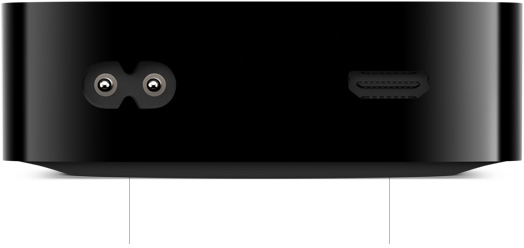
Apple lists an HDMI cable as a separate purchase. Choose a suitable cable for the intended output and keep the player's placement accessible for service. It should fit the furniture without creating strain on connectors or making the remote arrangement awkward. The built-in power supply simplifies the box's external power equipment, but the socket position and cable route still deserve planning. A small player can disappear visually while remaining difficult to reach when troubleshooting is needed.
Network behaviour should be checked with the television in its actual position. A good connection at a laptop on a nearby desk does not establish identical behaviour behind a large screen or inside a cabinet. Try ordinary viewing sessions before purchasing extra networking equipment. We would record interruptions and compare wired and wireless arrangements where available. The provisional ownership score reflects that the documented setup is relatively contained; it does not claim a trouble-free network or assign reliability based on the small number of components in the package.
The Standpoint verdict
Apple TV 4K makes the strongest research case for a household that can identify an interface, service or integration problem it addresses. The Ethernet and Thread configuration provides meaningful distinctions for buyers who need those functions. It is a weaker purchase when the existing television already delivers a comfortable routine and the new player would mainly duplicate it. Compare the current local price, subscriptions and accessories against that specific improvement before ordering.
Our next report would assess navigation, remote handling, format transitions, network recovery and shared-account use on an identified television and audio system. It would also record software versions and the exact player generation. Until then, the Standpoint Score describes a documented ownership proposition rather than measured speed or picture quality. The useful promise is a more predictable viewing routine. Whether that promise is worth paying for depends on the equipment and habits already in the room, not on the number of services pictured on a product page.
Sources & further reading.
These are the sources behind this research review. Manufacturer claims are not independent performance measurements. Community accounts, when cited, describe individual experiences.
Documentation reviewed: 9 October 2026. Product software and regional bundles can change. Corrections and editorial disclosures.