The ownership case.
A comfortable, well-understood noise-cancelling headphone whose value depends entirely on the physical condition of the individual pair. The codec range and micro-USB charging show the design’s age, but the core listening and cancellation experience remains well-regarded by long-term owners.
Reasons to consider it
- Three adjustable noise-cancellation levels via the Action button or Bose Connect app
- Well-documented comfort over long listening sessions, with low clamping force
- Simultaneous Bluetooth connection to two devices; remembers up to eight
- Wired listening via 2.5 mm cable when the battery is depleted
- Folding design with a compact carrying case
Go in knowing
- Bluetooth 4.1 with SBC and AAC only; no aptX or LDAC
- Micro-USB charging, not USB-C
- Used battery health cannot be verified from a listing photograph
- The Bose Connect app is required for Action button configuration and firmware updates; its long-term platform availability is uncertain
The specification sheet.
Published specifications from the linked sources. Configurations and availability can differ by country.
- Noise cancellation
- Three selectable levels (High, Low, Off) via Action button (when configured) or Bose Connect app; defaults to High without app
- Bluetooth
- 4.1 with NFC pairing; SBC and AAC codecs; simultaneous connection to two devices
- Battery claim
- Up to 20 hours wireless playback with noise cancellation enabled
- Charging
- Micro-USB; approximately 2.25 hours for a full charge; 15-minute quick charge for approximately 2.5 hours of playback
- Weight
- Approximately 234 g (8.3 oz)
- Wired connection
- 2.5 mm jack on left ear cup; included 2.5 mm to 3.5 mm cable (approx. 1.2 m)
- Microphones
- Dual-microphone noise-rejecting system for voice calls
- Voice assistant
- Dedicated Action button configurable for Google Assistant, Amazon Alexa (via firmware update) or noise-cancellation level control
- Controls
- Physical buttons: power/Bluetooth, volume up/down, multi-function (play/pause/skip/call), Action button
- Headband
- Alcantara cushioning on underside
- Construction
- Glass-filled nylon frame; synthetic protein-leather ear cushions
Which QuietComfort this is and why it matters
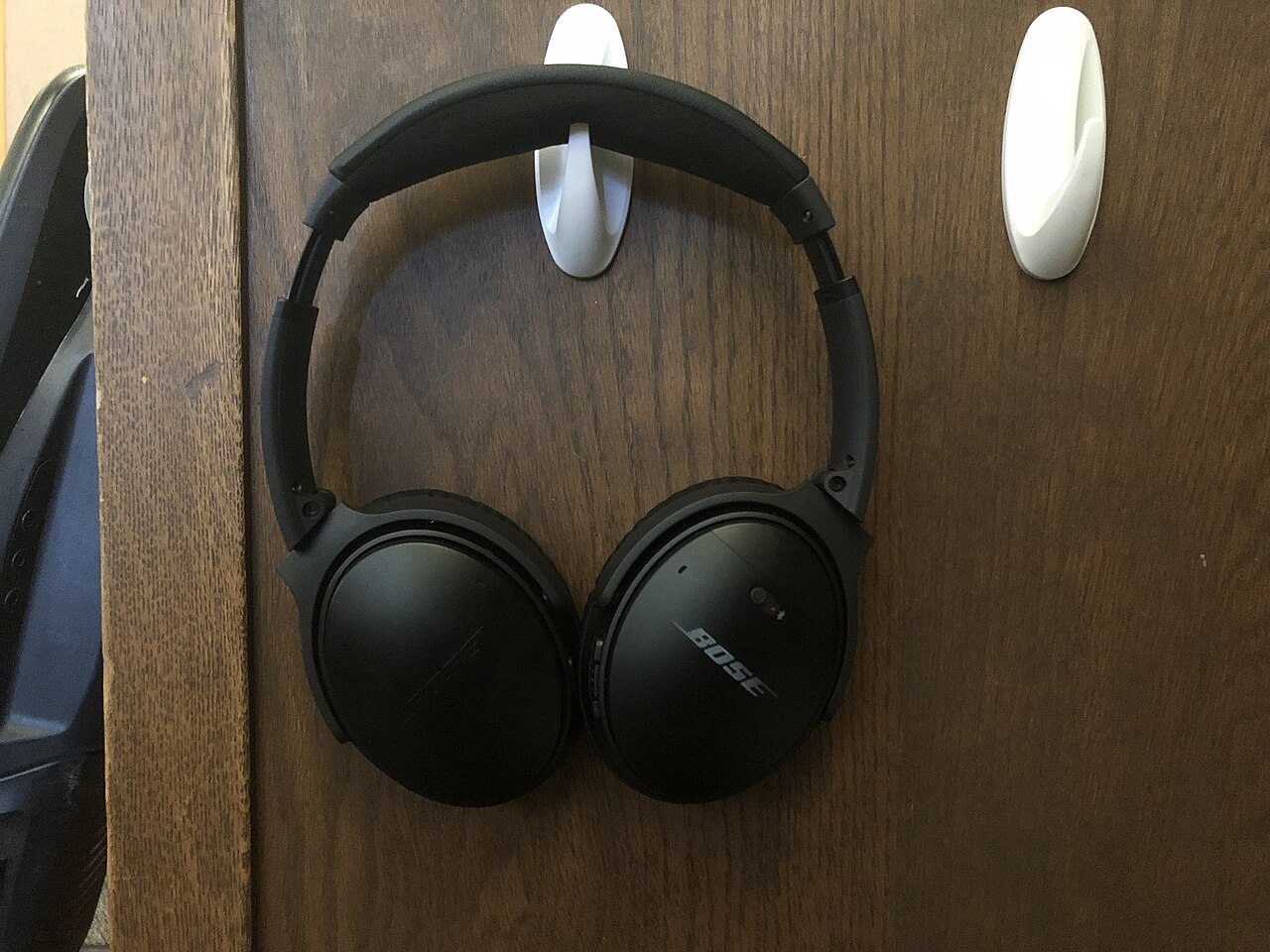
The QuietComfort 35 II is the second iteration of Bose’s QC35 wireless noise-cancelling headphone, released in September 2017. Its primary hardware addition over the original QC35 was a dedicated Action button on the left ear cup, initially mapped to Google Assistant and later expanded to support Amazon Alexa via a firmware update. The underlying noise-cancellation hardware and driver architecture carried over from the first QC35. This is not the QuietComfort 45, the QuietComfort Headphones released in 2023, or the QuietComfort Ultra. Those are separate models; their connection options, charging hardware and cancellation controls should be checked individually.
The distinction matters practically because used-market listings frequently group several QuietComfort generations under a single search term. A buyer expecting USB-C charging or higher-bandwidth codecs such as aptX or LDAC will not find those features on a QC35 II. Bose’s product page for this model remains the most reliable reference for confirming specifications and available firmware updates. The owner’s guide, available as a PDF from Bose, documents the physical controls, indicator lights, charging procedure and pairing process for this specific model.
Three cancellation levels and how they behave in practice
Bose provides three noise-cancellation settings on the QC35 II: High, Low and Off. High is the default when the headphones are powered on without the app. The Low setting reduces the intensity of cancellation, which some listeners prefer in quieter environments or when they want more awareness of their surroundings. The Off setting disables active cancellation entirely while leaving the headphones powered for wireless playback. These levels can be cycled using the Action button on the left ear cup when it is configured for that purpose through the Bose Connect app, or adjusted directly within the app itself.
RTINGS’ independent assessment found effective noise isolation. That finding is useful context, not a measurement made by this publication. A seal disrupted by glasses, hair or worn cushions can change what a listener hears. Try the High and Low settings in the environment that matters to you and check whether the sensation of cancellation is comfortable. Blocking the room sound you hear also does not establish how clearly another caller will hear your microphone.
A headphone that built its reputation on long-session comfort
RTINGS describes the QC35 II as comfortable. The approximately 234 g design and padded headband are worth considering for long listening sessions, but someone else’s fit is not a guarantee for your ears. Put the headphones on with your usual glasses and check whether the cups surround your ears or press against them. Leave them on long enough to notice pressure and heat rather than deciding from a brief demonstration.
Cushions and the headband deserve inspection on a used pair. Look for flattened padding, splitting surfaces and debris around the hinges. Replacement cushions can change fit and seal, so establish whether the installed pads are original before drawing conclusions about sound or cancellation. Check both hinges and the folding mechanism for play. The case helps keep loose items away from the headphones in a bag, but a case photograph tells you nothing about the condition of the pair inside.
Listening character and the missing EQ
RTINGS describes a broadly balanced sound with a modest bass emphasis. Its measurements belong to the sample and test conditions in that review. Bose Connect does not provide an equalizer for the QC35 II, which matters if you prefer to alter the headphone’s tuning rather than accept it. EQ in a player or operating system is a separate option and may not apply to every application or connected source.
Use familiar music with vocals, bass and quieter passages, then compare both ear cups at a moderate level. Check for rattling, intermittent sound and a channel imbalance before judging the tuning. Try the wired connection with power on and off as well; passive playback is not an identical listening mode. A used headphone with substitute cushions may not reproduce the seal of a review sample. We have not listened to this model, so no first-hand description of detail, soundstage or musical preference is claimed.
Bluetooth 4.1, codec limits and dual-device connection
The QC35 II uses Bluetooth 4.1 with SBC and AAC, without aptX or LDAC. A codec label is only part of a wireless connection: the sending device, application and connection conditions also matter. Do not choose this model expecting a newer high-bandwidth format to appear through a future update. For everyday listening, audition material you know on the phone you will use. The more immediate used-buying checks are stable playback, functioning controls and sound from both sides.
The QC35 II supports simultaneous Bluetooth connection to two devices and remembers up to eight paired devices in total. This means it can maintain active connections to, for example, a phone and a laptop at the same time, and will accept incoming audio from either. It does not mix two audio streams simultaneously: playback from one source must pause or stop before audio from the other comes through. NFC pairing is also supported, which simplifies the initial connection with compatible Android devices. The dual-device capability is a practical convenience for listeners who move between a phone and a computer during a workday, though it does not extend to three or more concurrent connections.
Physical buttons and the Action button's evolving role
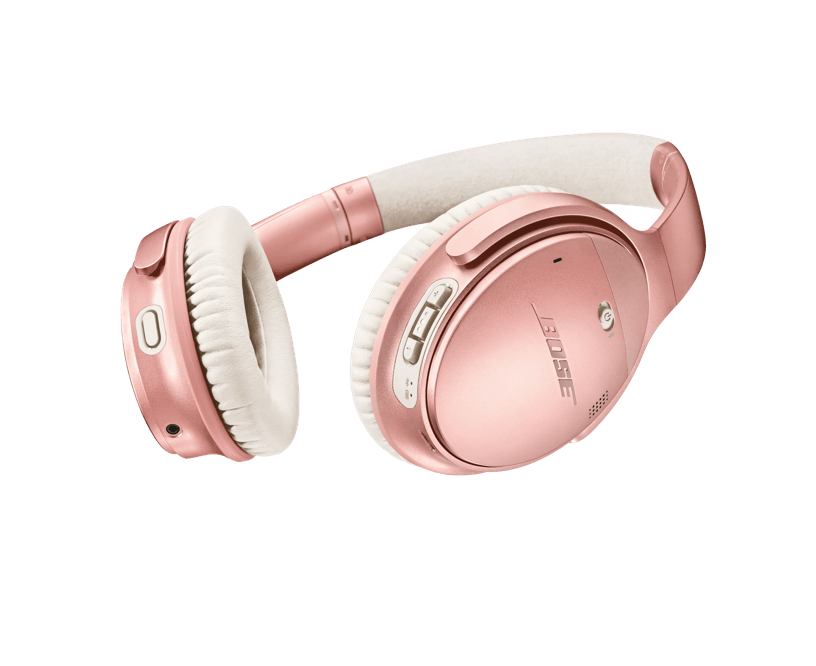
The QC35 II uses physical buttons rather than touch controls. The right ear cup houses power/Bluetooth, volume up, volume down and a multi-function button for play, pause, skip and call management. The left ear cup has the Action button, which was the QC35 II's distinguishing addition. At launch, the Action button activated Google Assistant through a compatible paired phone. Bose later added Amazon Alexa support through a firmware update, and users can also remap the button to control noise-cancellation levels instead of triggering an assistant.
Bose Connect configures the Action button. Set it to cancellation control if that is more useful than an assistant, then check that the button cycles the settings without reaching for the phone. Assistant services and mobile compatibility can change, so a launch-era demonstration is not evidence that every integration still works on your current device. Confirm the app installs and recognises the exact headphones before paying. This review does not promise the future availability of a mobile service.
The wired fallback and why it still matters
A 2.5 mm to 3.5 mm audio cable is included with the QC35 II, connecting to a recessed jack on the left ear cup. When connected via cable with the headphones powered on, noise cancellation remains active and the headphones process audio through their internal electronics. When the battery is fully depleted, the headphones can still be used passively through the cable, but noise cancellation is unavailable and the sound character changes noticeably. Bose's owner's guide confirms this passive capability.
The wired option gives the QC35 II a useful role that not all wireless headphones provide: it can continue functioning as a basic headphone when the battery dies, on aircraft entertainment systems with a 3.5 mm output, or with audio equipment that has no Bluetooth capability. The 2.5 mm connector on the headphone side is less common than 3.5 mm, so losing the included cable means sourcing a specific replacement rather than grabbing any standard cable. Inspect the cable and both connectors on a used pair. A loose or intermittent connection at the 2.5 mm end is an annoyance that can mimic an electronic fault.
Twenty-hour battery claim and the reality of used batteries
Bose advertises up to 20 hours of wireless use. That is a manufacturer rating for a new product, not a measurement of the used pair being sold. Charging uses micro-USB, so confirm a suitable cable is included and that the connector holds it securely. A listing that simply says it charges is incomplete: power it on after charging, check the reported level and play audio for a meaningful period during the return window.
Age and use can reduce battery capacity, but there is no honest way to assign remaining runtime from a manufacture date alone. Ask about daily use, storage and any repairs; verify the answer through an actual session. The battery is not designed as a simple user-swappable part. If a seller proposes a replacement, ask who performed it and what return protection applies. A cheaper pair needing service can cost more than a healthier pair with new cushions. Passive wired listening remains useful, but it does not restore battery-powered cancellation.
Voice calls and the dual-microphone system
RTINGS rated phone-call performance as fair and described the recorded voice as thin and muffled, especially in noise. That is a limitation worth taking seriously if meetings are a main reason for buying. The cancellation you hear can make a room feel quieter while the microphone still sends poor speech to the other person. A Bose claim about noise rejection should not replace an actual call using your intended application.
Check calls separately from music playback. Use the phone or computer you plan to connect, then ask someone to listen in a quiet room and with ordinary background sound present. Check switching between a laptop playing audio and an incoming phone call as well. Multipoint convenience does not guarantee every application handles the transition gracefully. We have not recorded this model ourselves, and no condition claim is made about a particular used pair.
The Bose Connect app and the software support horizon
The Bose Connect app provides noise-cancellation level adjustment, Action button configuration, device management and firmware updates. It is a separate application from the Bose Music app used by newer Bose products. The QC35 II does not work with the Bose Music app. This creates a practical question about how long the Bose Connect app will remain available and functional on current smartphone operating systems. Bose has not published a specific end-of-support commitment for it.
Once configured for cancellation, the Action button offers hardware adjustment without opening the app each time. Basic playback does not depend on continually running Bose Connect. Setup and firmware management are a different matter, so check those functions during a return period rather than assuming a successful Bluetooth connection proves all configuration features work. Keep the distinction between the QC35 II and newer Bose models clear when following online instructions; the newer product’s app and settings are not necessarily applicable here.
Verdict: proven comfort with an honest assessment of age
The QC35 II makes most sense when its fit works for you and a healthy pair costs sufficiently less than a suitable newer alternative. Its physical controls, configurable cancellation button, two-device connection and passive cable option are concrete reasons to consider it. Micro-USB, the absence of app EQ and modest microphone results are equally concrete reasons to compare alternatives. A newer charging socket alone does not make another headphone comfortable, but this older model’s reputation cannot establish the condition of a used pair.
For travel and desk listening, audition the fit and check charging, cancellation and source switching before deciding. For voice work, give call quality its own test rather than treating music playback as sufficient. We have not worn or measured these headphones. This assessment combines Bose documentation with attributed independent observations and practical purchasing analysis. Original testing would need to establish comfort over time, runtime, cancellation and microphone performance on an identified unit. Until then, a conditional recommendation is more useful than an unsupported numeric score.
Sources & further reading.
These are the sources behind this research review. Manufacturer claims are not independent performance measurements. Community accounts, when cited, describe individual experiences.
- Bose QuietComfort 35 II product page ↗manufacturer
- Bose QuietComfort 35 II owner’s guide (PDF) ↗manual
- RTINGS.com Bose QuietComfort 35 II review (measurement-based evaluation) ↗independent review
Documentation reviewed: 9 October 2026. Product software and regional bundles can change. Corrections and editorial disclosures.